Engadget has a step-by-step guide to upgrading your Series 3 drive. In the example they go from a 250Gb drive to a 500Gb one, with the resulting absurd number of recordable hours. If you're in Canada and thinking of trying out a Series 3, this extensive review will show you the pluses and minuses of trying it up north.
October 26, 2006 by Matt Haughey in TiVo | permalink
| Comments (0)
Word of the Day: TiNo (first coined here).
TiNo v. To not watch a TV show saved on a TiVo or other personal video recorder. —n. An unwatched show saved on a TiVo or other PVR. [Blend of TiVo and no.]
The number of suggested recordings on my TiVo right now is about 120 shows, almost all of which will be TiNo'd.
October 25, 2006 by Matt Haughey in News | permalink
| Comments (0)
Dave Zatz noticed the TiVo Community Forum's new store is selling the s3 for $680. Still a high price (it'd be nice if the Series 3 was in the $300-500 range), but better than the price you'd find anywhere else.
October 24, 2006 by Matt Haughey in News | permalink
| Comments (0)
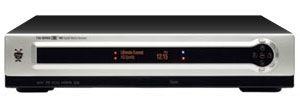 Weaknees has launched upgrade kits for the new Series 3 TiVo. Since the box is single drive only and no external (though someone did hack their way into adding external storage but I wouldn't recommend such drastic measures), these kits range from 500 to 750Gb drives that offer up to 60 and 100 hours of HD recording.
They also have a handy table of CableCARD pricing that summarizes a lot of blog and forum posts. I should note that while Comcast told me my two CableCARDs would be free, my first post-TiVo monthly bill says they are charging me $1.50 per card, which isn't enough to complain about but still kind of weird since they said it was free from the start.
October 18, 2006 by Matt Haughey in TiVo | permalink
| Comments (0)
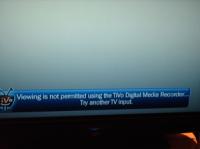 Ouch: Cnet has an incredible story about DRM blocking HBO and Universal HD programs from playback, seemingly due to some bad digital rights flagging. This kind of thing should never happen to a customer, especially one just trying to watch some TV. Hopefully JVC and TiVo release a fix soon.
It's a shame that studios are so freaked out about piracy of digital content that they have to foist these "features" on end users, which in the end do little but aggravate owners trying to legitimately use their products.
October 11, 2006 by Matt Haughey in News | permalink
| Comments (10)
I love my new series 3 TiVo and I'll post a review in the next few days, but one thing keeps jumping out at me whenever I use it, and it's the new remote. After using it for a couple weeks, I have to say I don't like it, and I've figured out the problem.
Take a look at the button layout of an old Tivo remote and compare to the new one:
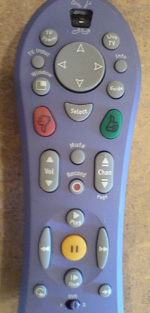
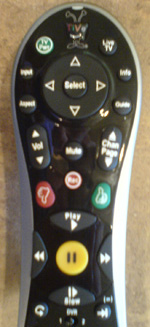
Did you notice how the volume/channel rockers moved up, and the thumbs up/down moved down? That little change is a big problem.
I've had a total of five TiVos over the past six years and with all of them, I've been able to use it by feel, without looking, thanks to the simple tight layout. All the normal things I do when watching TV like change channels, alter volume, and fast forward are within easy reach. You can leave your thumb in one spot and reach them all. The direction/select stuff was always at the top, but once you learned how far to "jump up" the remote with your thumb, it was easy to select a show, then start watching it and changing volume while zipping through the boring parts.
With the new remote, it's taking a long time to learn how to jump over those thumbs up/down buttons without looking. Now, maybe it's my muscle memory here that is the problem, but I've used other remotes and they often keep the most frequently used buttons together within easy reach.
Here's a highlighted view of my remotes, showing the differences:
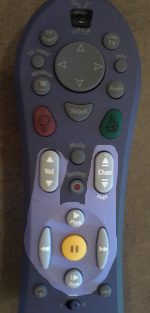
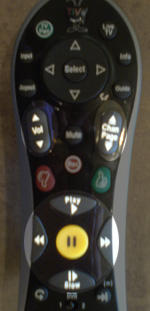
I know that years of research went into the remote design. In my past interview with the head of user experience at TiVo, she covered the design of the remotes. I am surprised by these changes, since I don't often rate shows after the first couple weeks I own a TiVo. To help the suggested recordings engine, I might triple thumbs up the 4-5 shows I love and do the opposite with the ones I dislike, but after that early learning period, I don't use it at all. With the new remote, the ratings buttons are always there in the way.
On the other hand, I use the volume button constantly. Every channel has different volume levels and even within a single recording the ads are going to be much louder and dialogue is going to be quieter than action sequences. With a baby in the house, I'm using the volume button more than the fast forward these days, so from the moment I started using it, I noticed this new change.
Another minor quibble: the play/ffwd/rwd/slow area now has bigger buttons which is a good thing, but the buttons have sharp edges and similar shapes. With the old remote, the buttons are much smoother when your thumb is resting on them and the less important ones (like the slow button, which I use maybe once a month during an instant replay of sports, but otherwise not at all) are much smaller and less likely to be hit by accident.
Again, maybe it's just me and I realize these may sound like minor quibbles, but I definitely feel like the new remote isn't as easy to use and I'm constantly looking down at the remote to make sure I'm hitting the right button, which is something I haven't had to do in years with the previous TiVo remote designs. I'd love to hear the reasoning behind the change in the button layout.
October 3, 2006 by Matt Haughey in Product Reviews | permalink
| Comments (20)
Over on the tivocommunity.com forums, there's been a lot of chatter about how and why TiVoToGo was disabled in the new Series 3 box. Everyone seemed to be pointing fingers at Cablelabs, TiVo, and the Hollywood studios. The EFF just published a short paper called EFF: Who Killed TiVoToGo? that looks into the issue. The most choice bit:
CableLabs has yet to permit TiVo to implement TiVoToGo in the CableCARD-compatible Series 3 HD. TiVo must first create a set of restrictions that satisfies CableLabs, and, if it cannot, the feature will remain extinct. Hollywood has openly wanted to rein in TiVoToGo, and any revived version will be more limited than its predecessor. Again, if Hollywood and cable companies had originally obtained such a veto power over the DVR itself, TiVo might never have been born.
The EFF has been beating this anti-DRM drum for years but it certainly looks like their fears of digital TV being locked down with DRM and hindering innovation is coming true.
October 3, 2006 by Matt Haughey in News | permalink
| Comments (5)
It sounds like one of the first reported problems with the series 3 TiVo is that the infrared sensor might not work if you have a plasma/LCD TV and set the TiVo close to the TV's own sensor. People are saying it'll require a hardware change to fix and one enterprising owner has already done that on his own (here are the full instructions).
I have a plasma and a series 3, but the TiVo is in a lower cabinet about 8 feet away from the TV, which is mounted back up on a wall. I get great remote coverage, easily out performing the Comcast DVR it replaced. From reading the tivocommunity thread, It's unclear if this is due to certain models, backlights, or just faulty hardware.
If you're running into these issues, be sure to check out the thread on it. [thanks for the tip Wook]
September 26, 2006 by Matt Haughey in TiVo | permalink
| Comments (4)
 Interesting news/rumor from TechCrunch: Will Tivo box the Amazon Unbox?
Although Amazon's Unbox has already caught some heat for the lame DRM behind it, I have to say I think it'd be a great fit if this turns out to be true. Two years ago, Netflix and TiVo were going to work together but eventually that idea died. Also, Apple entered the fray by announcing the iTV player to come out next spring and Amazon could beat Apple to the punch by using the already-installed hardware of TiVo boxes nationwide.
I'm a big fan of watching stuff on the couch. Currently I run a hacked xbox wired to a plasma TV and I frequently use usenet and bittorrent to grab missed TV shows. I have it completely automated to where I just click a single download link and about ten minutes later I can enjoy it in the living room. Video quality varies but is usually pretty good but I do wish HDTV were possible (and that my xbox had hdmi out).
I don't just download ripped TV shows, I also pay for video downloads. I've got a video ipod and I buy a lot of shows from the iTunes Music Store to enjoy on planes, trains, and automobiles. It is kind of frustrating when you come home and want to finish a show on your TV and instead you have to use a computer.
I'll likely buy an iTV when it comes out, but given Amazon's endless inventory and my already existing TiVo sitting in my living room, I'd go that route as well if it meant quick access to any movie or DVD in their inventory.
September 22, 2006 by Matt Haughey in News | permalink
| Comments (13)
 David Pogue's amusing video love letter to the new Tivo. Here's his full review in today's New York Times.
September 21, 2006 by Matt Haughey in News | permalink
| Comments (6)
« Archives